Last week, I had a session in M365 Show about a topic that many Power Platform admins are only beginning to recognize in their daily work: the governance model we have relied on for years no longer fully applies to AI agents.
Scaling AI Agents Securely: Next-Level Governance for Power Platform Admins
This is not because existing governance practices are wrong. Environment strategy, DLP, Purview, ALM, and Copilot Studio controls are still essential. The change comes from Microsoft introducing new foundational services that redefine what an AI agent is from a governance perspective and how it must be managed across the tenant.
These changes are built around three key components:
- Microsoft Agent 365 – a central control plane and registry for agents
- Microsoft Entra Agent ID – a true identity model for agents
- Azure AI Foundry control plane – enabling advanced and hybrid agents across the same tenant
For Power Platform admins, this is not architectural background information. It directly affects how you discover agents, approve them, monitor them, and respond when something goes wrong.
AI agent governance is changing because agents themselves have changed.
You Already Govern Apps – AI Agents Do Not Behave Like Apps.
Power Platform governance is built on very familiar concepts:
- Environments and environment strategy
- Connectors and DLP
- Ownership and sharing
- ALM and solution lifecycle
- Integration with Purview and Defender
These work well because apps and flows are fundamentally user-driven artifacts. A user triggers them. A user owns them. A user shares them. But AI agents might break this model.
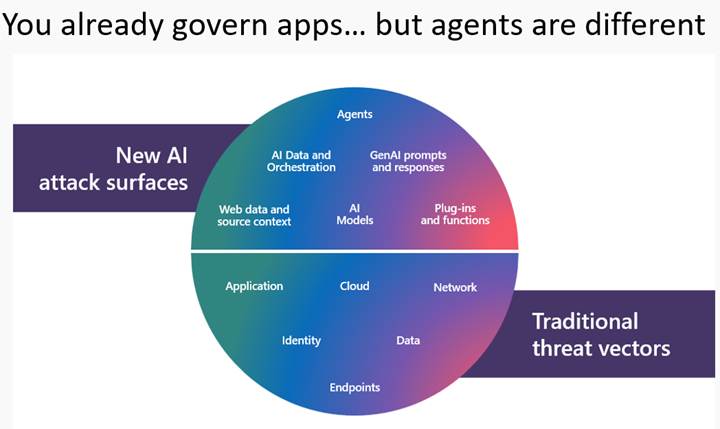
Agents:
- Operate autonomously without user interaction
- Continuously access and process data
- Invoke APIs, apps, and even other agents
- Can be created in multiple tools (Copilot Studio, Microsoft 365, Foundry, Teams Toolkit, custom code) and connect with each other’s
- May exist without clear ownership or visibility
- Act at machine speed, not human speed
The practical implication is significant. Agents operate independently from the user lifecycle you are used to governing. This is why Microsoft introduced Agent 365 and Entra Agent ID.
Agent 365 – Central Agent Registry Changes Governance
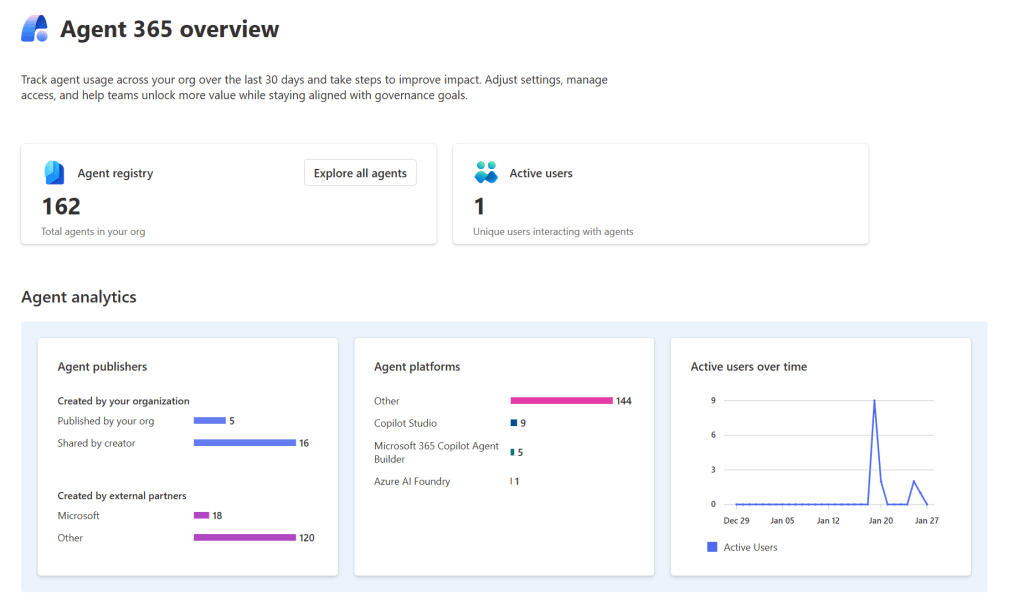
Agent 365 provides a tenant-wide registry and control plane for AI agents across Microsoft 365, Power Platform, Copilot Studio, and Azure AI Foundry. For Power Platform admins, this is not just another portal. It fills a gap that has existed since the first Copilot and Copilot Studio agents appeared.
Microsoft Agent 365 overview | Microsoft Learn: AI Agent Governance Is Changing – What Power Platform Admins Must Know?Today, you can easily answer:
- What apps exist in this environment?
- What flows use this connector?
- Who owns this solution?
But without Agent 365, you cannot reliably answer:
- What agents exist across the tenant?
- Which were built outside Copilot Studio?
- Which agents access sensitive data?
- Which agents are still active but no longer maintained?
- Are there shadow agents nobody knows about?
Why this matters in practice
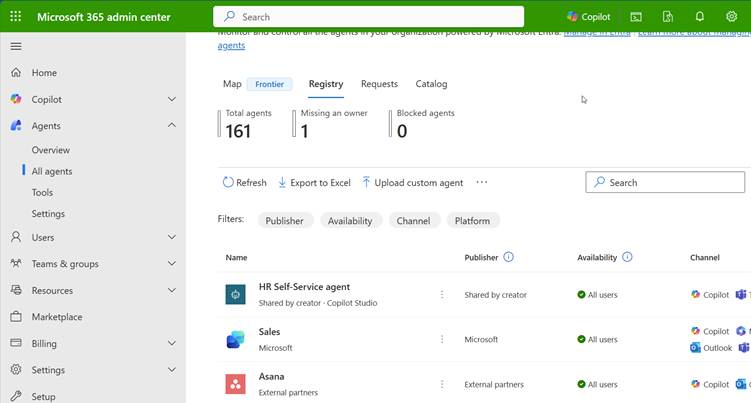
Agent 365 becomes the starting point for governance:
- Approval processes can require agents to be visible in the registry
- Risk classification can be based on registry data
- Inventory reviews can include agents alongside apps and flows
- Shadow agents become discoverable instead of invisible
Without this visibility, governance is reactive. With Agent 365 Registry, governance becomes proactive. The registry provides a complete view of all agents used in your organization, including agents with agent IDs, agents you register yourself, and shadow agents.
Agent 365 Access Control – Connecting Agents to Risk and Policy
Agent 365 is not only about inventory. It connects agents to access control, risk evaluation, and governance policies.
Agents often use:
- SharePoint and OneDrive data
- Dataverse
- External APIs
- Enterprise systems via connectors
As a Power Platform admin, you already define which connectors are allowed, how data can cross environments, and how DLP policies restrict connections. Especially with connected agents, you need to start considering which agents are allowed to access which data sources, and under what conditions?
Agent 365 lets you see these relationships, so actual agent behavior, rather than assumptions, informs your governance policies.
Entra Agent ID – Identity Is the Key
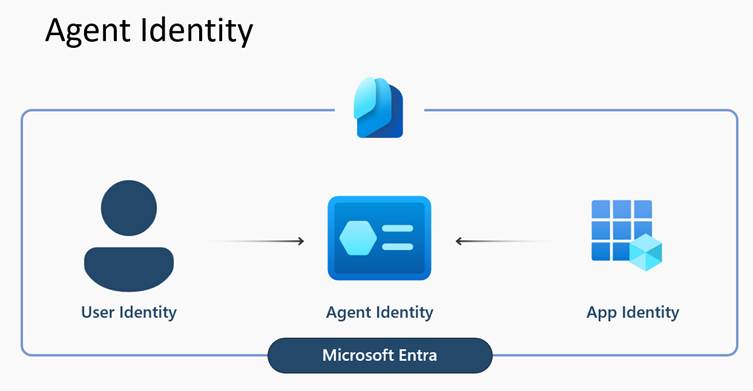
The introduction of Agent Identity in Entra is an important change for governance.
What is Microsoft Entra Agent ID? – Microsoft Entra Agent ID | Microsoft Learn: AI Agent Governance Is Changing – What Power Platform Admins Must Know?Previously, many agents operated using maker credentials, shared service accounts, or authentication patterns that were never designed for autonomous digital actors. This made it difficult to answer basic governance questions such as ownership, responsibility, and how to apply identity and security controls consistently.
With Entra Agent ID, agents become first-class identities in the tenant.
Agents will have:
- Their own identity in Entra
- Defined lifecycle management
- Sponsors and managers linked to them
- Conditional access policies applied to them
- Identity protection and traffic filtering
- Inclusion in access governance and access reviews
Why this is critical for Power Platform admins
For Power Platform admins, this shifts the focus from who built the agent to who the agent is in the directory and what that identity is allowed to do. This created risks such as:
- What happens if the maker leaves the organization?
- Who is responsible for the agent?
- How do you apply conditional access to something that is not a user or an app?
Entra service will offer the tools and capabilities to maintain business ownership, sponsoring details, and workflows. With Entra Agent ID, agents become fully governable identities within the tenant. You can require sponsors before an agent is published, apply conditional access policies directly to the agent, and clearly define ownership and responsibility. If needed, an agent can be disabled without impacting any user accounts.
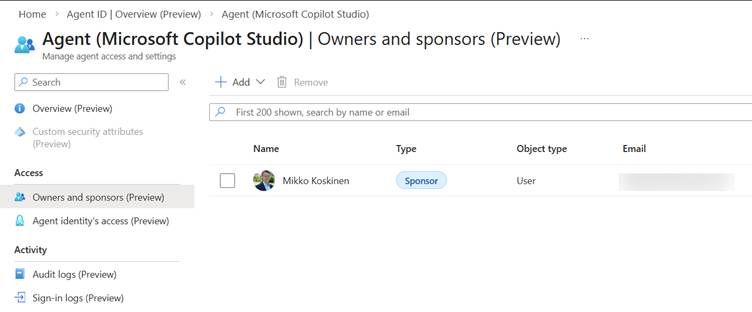
As a result, agent governance aligns naturally with the same identity governance model already used for users and applications.
Purview – Data Governance Must Now Include Agent Workflows
Once agents have an identity and are visible in Agent 365, Microsoft Purview can extend data governance into agent interactions.
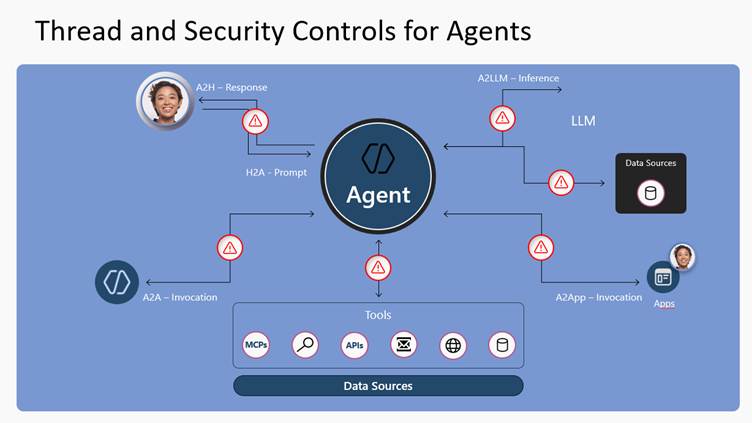
Agent 365 – Data security | Microsoft Learn
With Pureview, you can:
- Classify and label data used in agent workflows
- Apply DLP to agent interactions
- Prevent agent-driven data oversharing
- Monitor sensitive data access by agents
- Extend compliance controls to agent scenarios
Why does this matter for Copilot Studio and Power Platform agents?
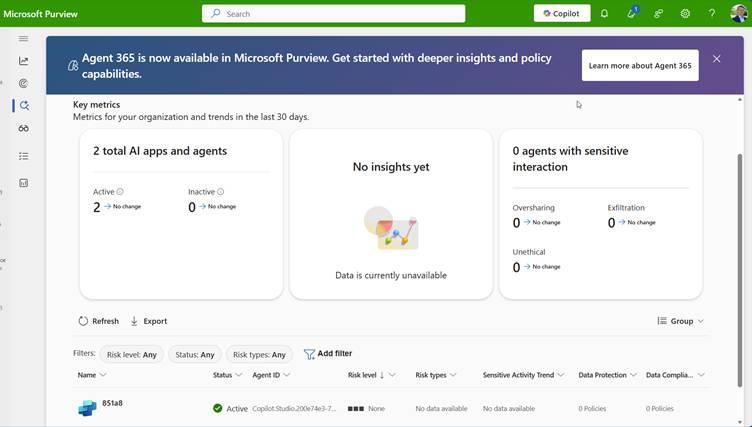
Many agents read SharePoint content, interact with Dataverse, summarize internal documents, and combine data from multiple sources. This creates a genuine risk of unintentional oversharing at scale. Traditional DLP policies designed for apps do not fully cover these scenarios, but Purview’s visibility into agent activity helps close that gap.
Defender – Security Teams Can Finally See Agents
With Agent ID and Agent 365 integration, Microsoft Defender can now treat agents as first-class security objects, making them visible, actionable, and protected throughout their runtime.
Agent 365 – Threat protection | Microsoft Learn
Defender’s protections inspect agent actions before they run them, block unsafe behavior (such as suspicious tools being invoked), and generate alerts integrated into your broader security incident and response workflows.
Security teams can:
- Detect prompt injection in real time
- Monitor agent security posture
- Perform threat hunting tied to specific agents
- Investigate incidents where agents are involved
- Create custom detections for risky agent configurations
What does this mean for Power Platform Admins?
For Power Platform administrators, this matters because it extends your governance model to the runtime behavior of agents—not just their configuration or registry. In the past, security controls could tell you what an agent should be allowed to do. With Defender’s real-time protections, you can also see and stop what an agent attempts to do before it impacts data, services, or compliance.
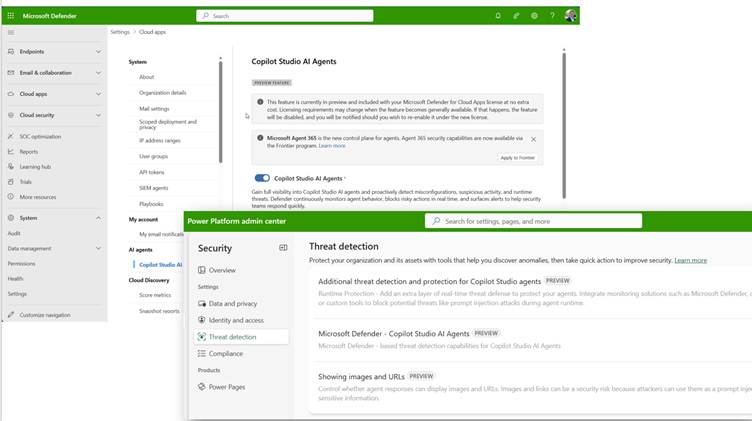
This bridges the gap between governance, compliance, and active defense, giving your security and operations teams a much clearer, actionable picture of agent behavior mapped to specific identities.
Azure Foundry – Why It Matters for Governance
It’s easy to think of Azure AI Foundry as simply “developer territory.” That assumption is misleading — especially when you consider how agents built in Foundry integrate with the rest of your Microsoft 365 estate.
What is the Microsoft Foundry Control Plane? – Microsoft Foundry | Microsoft Learn: AI Agent Governance Is Changing – What Power Platform Admins Must Know?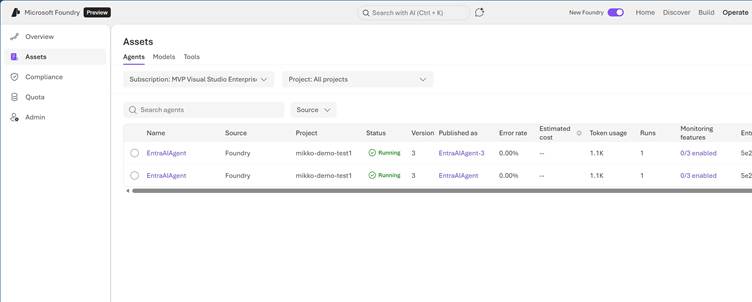
Agents created in Azure AI Foundry:
- Appear in the Agent 365 registry alongside Copilot Studio agents
- Use Entra Agent ID for identity and access governance
- Access the same tenant data sources that your Power Platform and Copilot Studio agents use
Because Foundry agents participate in the same governance constructs, your responsibilities as a Power Platform admin do not stop at Copilot Studio. The real question becomes:
How do we govern all AI agents operating in this tenant, regardless of where they were built?
This shift means you must extend your governance lens beyond familiar tools to include agents from any development surface that integrates with your tenant’s identity, data, and security controls.
What This Means for Your Governance Processes
Because AI agent governance is changing, the processes you already have for apps and flows must evolve to account for agents as independent, identity-backed actors in your tenant.
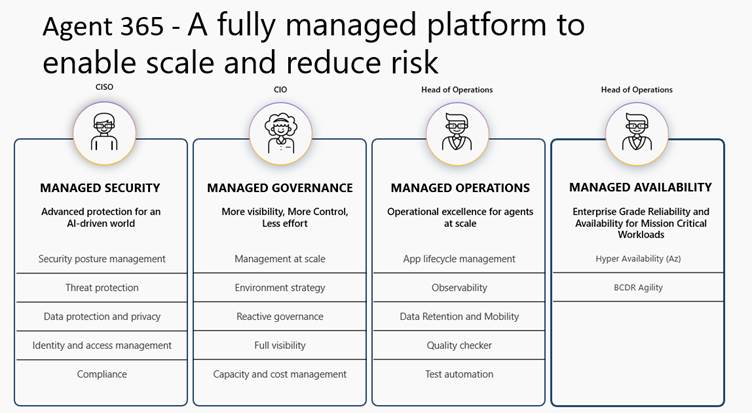
Onboarding and approval
Before an agent is published, it should not only be technically ready but also governance-ready. This means the agent must be:
- Registered and visible in Agent 365
- Assigned an Entra Agent ID
- Linked to clear ownership (sponsors and managers)
- Risk-classified based on the data and systems it will access
ALM and environment strategy
Enterprise-grade agents should not follow the same path as personal maker experiments. They must follow structured ALM practices:
- Built-in supported environments and tools
- Promoted through environments using controlled processes
- Reviewed before broad sharing or production use
Monitoring
Ongoing governance requires visibility across multiple dimensions. You should continuously monitor:
- Agent inventory and status in Agent 365
- Identity posture and access rights in Entra
- Data access patterns through Purview
- Threat and anomaly signals through Defender
Incident response
Security operations must treat agents as potential actors in incidents. SOC playbooks should be updated so teams can quickly determine:
- Which agent was involved
- What identity was used
- What data and systems does it access?
Decommissioning
Agents must be retired like identities, not simply deleted like apps. Proper decommissioning includes:
- Removing the Agent ID
- Revoking access rights
- Removing the agent from the registry
- Preserving audit history
All of this becomes realistic only because Agent 365 and Entra Agent ID provide the technical foundation to support it.
The Key Realization
AI agent governance is no longer an extension of Power Platform governance.
It is now part of tenant-wide identity, security, compliance, and operational governance.
Power Platform admins are central to this shift because they already understand governance deeply. But remember that you are no longer just managing apps and flows.
You are managing a growing workforce of autonomous digital actors operating across your tenant.



 Mikko Koskinen
Leave a comment