
Although I might be focusing on agents and Copilot Studio governance in general, I also work on the building side. Most importantly, I discuss, listen to, and teach agents and their possibilities as part of my everyday work. During my studies, my major was information systems, not software technology. I’ve always been interested in understanding the processes, business, and how people do their work.
When I walked into the room at AgentCon Helsinki to run my session on Designing Smart Conversations with Copilot Studio, I knew we weren’t going to talk about code first. We were going to talk about people for a room full of developers.
Here’s the truth: when organizations start building AI agents, the first question they often ask is, “How can I connect the data and have AI to help?” But that’s the wrong starting point.
An agent doesn’t know anything when it’s born. It’s more like a new intern than a finished product. If you don’t take the time to explain its purpose, role, and limits, it will fail — no matter how many databases you connect it to.
My presentation slides are here: AgentCon Helsinki – Designing Smart Conversations.pptx
Start with People, Not Data
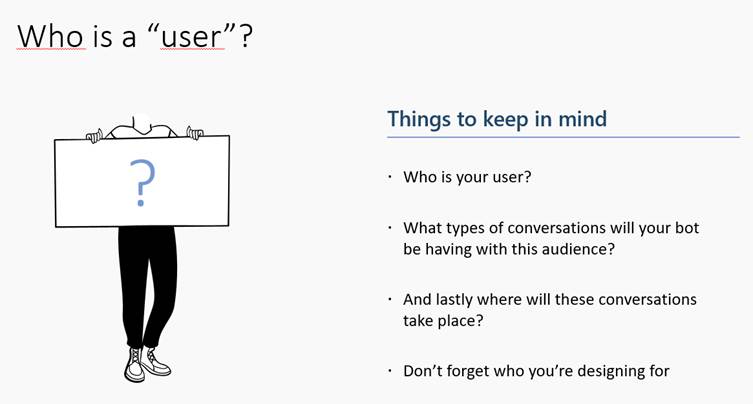
During the session, I asked participants: “Who is your user?”
- An HR assistant helping employees?
- A manager on the factory floor?
- A customer looking for support?
Different users will have varying interactions with the Agent, depending on their specific needs, even if the Agent utilizes unified knowledge sources. Sometimes, you even need different agents to serve all the needs. If you skip this step, you’ll end up with a bot that’s technically “smart” but practically useless.
Take the Time to Plan
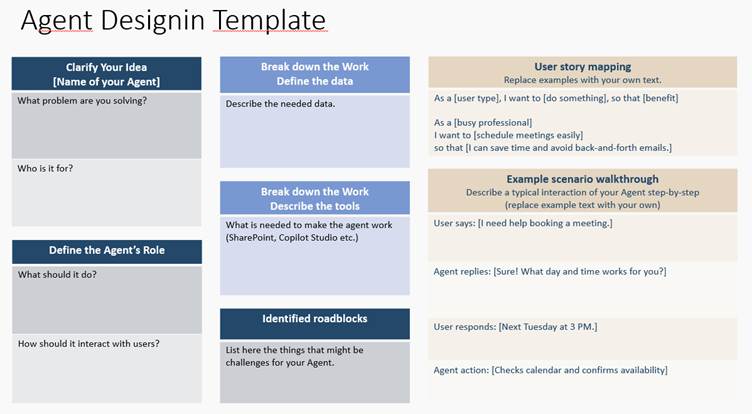
Before jumping into building your Agent, you should sit down and take some time to plan and describe the use case and purpose of the Agent or AI-driven process.
- Clarify your idea:
- What problem are you solving? Who is it for?
- Why and how are we planning to benefit from AI?
- Define the Agent’s role:
- What should it do, and how should it interact with users?
- Break down the work:
- Identify the key steps, tools (actions, API’s), and data you’ll need.
- Avoid roadblocks:
- Identify potential challenges early and consider effective solutions.
- Stay focused:
- With a clear plan, you’ll build faster and smarter.
While working with the business and people to plan the agents, we use simple story maps and templates to break down real user journeys and make the necessary planning. This helps clarify the need and provides tools to plan according to the Agent’s instructions.
User Story Planning – Why it matters?
Your business process is simple, especially if you explain to others how you do something that you do constantly.

One example we walked through was as simple as “Text Madison.” Sounds trivial, right? But quickly it spirals into: which Madison, which phone number, what if there’s no mobile, what if the user cancels midway? That’s where real conversation and agent design begin.
What you need to remember is that AI or an Agent is unable to know and understand all the details or information that you might be using when conducting your work or business processes.
What you need to do is to teach.
Writing Instructions Like You Mean It
In Copilot Studio, you get 8,000 characters to write instructions for your Agent. Most people use a few lines. That’s like giving your intern a sticky note with “help customers” written on it and expecting miracles.
Instead, you need to spell things out:
- What role does the Agent play?
- What are the main steps it needs to take?
- What are the subtasks or side steps that are required?
- What do all the knowledge sources and tools mean, and for what are they used?
- How should the Agent use and prioritize the capabilities it has?
- What should it avoid?
- How should it handle errors?
- The tone of voice should be used.
Treat your Agent as an intern who hears about your process for the first time when you start planning. What you need to write is SOPs.
Standard operating procedures (SOPs) are a set of detailed, step-by-step written instructions designed to ensure a task or process is performed consistently, efficiently, and safely by all employees. In this case, the employee is your Agent.
When I demoed this, we saw just how much difference strong instructions make. Suddenly, the Agent wasn’t just answering; it was guiding the conversation, asking clarifying questions, even adapting its behavior to context.
Design for the Real World (Errors Included)

One of the most interesting discussions with agents is the balance between control and flexibility. Copilot Studio offers both:
- Classic topics for tightly scripted flows (perfect for processes where compliance and accuracy matter).
- Generative orchestration where the AI plans dynamically across tools and knowledge.
The trick isn’t choosing one. It’s knowing when to combine them. Critical scenarios need guardrails. Everyday Q&A can benefit from freedom.
Another thing not to forget is to plan for the unexpected. I’ve witnessed this multiple times. You create an agent, for example, a meeting assistant agent. It works beautifully — until something goes wrong.
What happens when an API fails? When is data missing? When does the user ask something out of scope?
Too often, agents freeze or throw unhelpful errors. The better ones handle it like a human colleague:
- “I couldn’t find that. Do you want me to escalate?”
- “That information isn’t available, but here’s where you can check.”
It’s these moments — the messy edge cases — that separate a good agent from a frustrating one.
The Takeaway
Building an agent isn’t about wiring data to AI. It’s about teaching a new colleague how to talk, how to listen, and how to help.
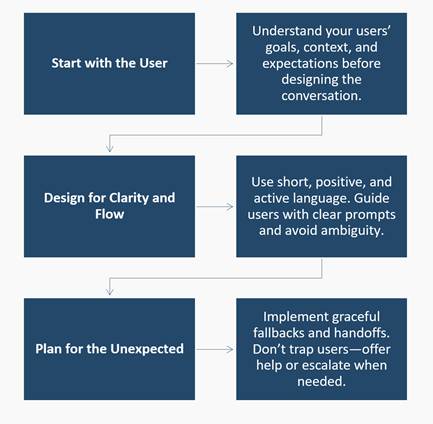
That means:
- Plan with people in mind.
- Write detailed, thoughtful instructions.
- Balance control and generative power.
- Design for errors, not just success.
- Gather feedback and iterate.
Agents aren’t built in a sprint. They’re trained, shaped, and improved over time. And if you do it well, your users won’t just get answers — they’ll feel like they’ve been heard.


 Mikko Koskinen
Leave a comment