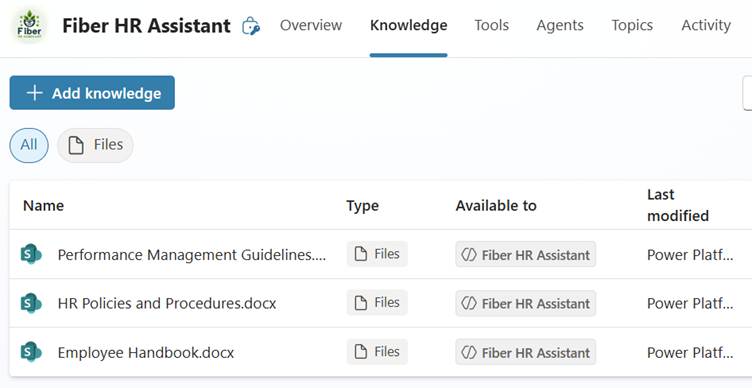
Suppose you plan to use SharePoint or OneDrive documents as a knowledge source for your Copilot Studio agent. In that case, there is now a better way to bring those documents to the agents than linking through the traditional connector or uploading.
The new document sync feature will keep your documents up to date and provide better-quality answers.
Sync the Documents
For content editors, the new sync functionality offers an easy way to maintain documents in SharePoint or OneDrive. All changes will be synced automatically and will be available to the agents. You can also sync a folder or document library. The changes (adding or deleting) to the documents will be reflected to the agents without the need to make changes and republish the agent.
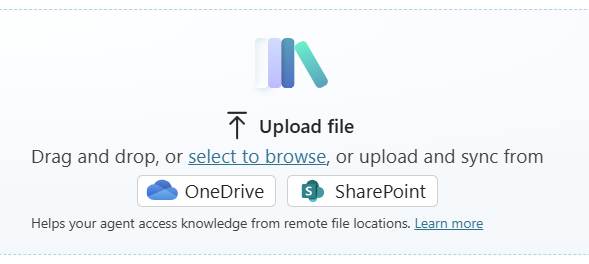
- Start adding a new knowledge source as you normally would.
- Remember to select SharePoint/OneDrive from the ‘Upload file’ section, not from the ‘Connector’ section.
- Navigate to the desired library or folder and select the documents you want to use as knowledge.
- Then, click ‘Add,’ and the sync will start.
Things to Notice
The sync works the same way as when uploading the document manually. Selected files will be uploaded to Dataverse. The biggest difference is that you don’t need to use “hacks” like Power Automate or manual processes to keep the documents up to date.
- It may take a few minutes for the document to become available to the agents, as setting things up in the background requires time.
- The updates are performed through a scheduled background process.
- If the document is updated, it may take 4 to 6 hours for the changes to be synced and made available to the agent.
- Please note that the added document will utilize the Dataverse capacity allocated for Copilot Studio.
Also, note that the normal SharePoint or OneDrive limitations also apply to these synced files.
Limitations for SharePoint
- A total of 200 files, 50 folders, and 10 layers of subfolders can be included for each source.
- Folders are represented as a single knowledge source, which contains all of their content.
- 32 MB per file
- Supported file types: doc, docx, xls, xlsx, ppt, pptx, pdf
One issue where I would like to see an update soon is that documents protected with sensitive labels cannot be used through this addition type.
More information: Quotas and limits – Microsoft Copilot Studio | Microsoft Learn
End-User Experience
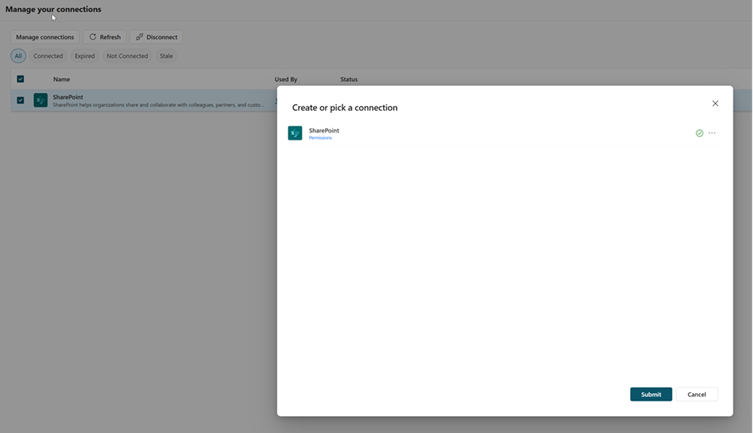
Unlike traditional SharePoint or OneDrive connections, there is one key consideration when using the sync method. Synchronization is achieved through a Power Platform connection.
To keep things secured, each end-user needs to initialize their own connector when they use the agent for the first time. This way, only the files to which the end-user has access are available to them.
This adds an extra step for the end user, and you need to ensure they are aware of how to create the connection. I recommend documenting these steps for the user or having a quick presentation for them when you publish the agent in production usage.

- When the user starts to use the knowledge source through the agent, they will see a warning and a request to create a new connection.
- They need to click the Connect button.
- A new window is opened from where they can add a new connection for themself.
- After a successful connection creation, they need to return to the agent and click the Retry button to continue.
Effect of the Sync? Better Quality
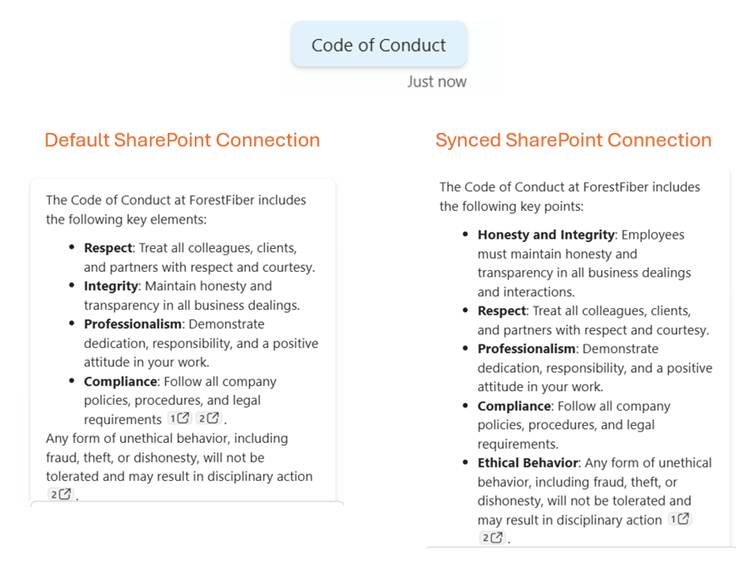
Why do I think this is a better way to use documents as a knowledge source, and why do I use this method so often?
In the image above, you can see two different kinds of answers for the same question based on the same documents in SharePoint. As you can see, the synced files provide a better-quality answer.
As you can see, the synced files provide a better-quality answer.
The main reason is that the documents are uploaded to the Dataverse. Microsoft has built and maintains an infrastructure behind the scenes to ingest raw files, create indexes, and vector embeddings, which help provide quality responses for your agents. Basically, you don’t have to know or do all the heavy lifting to build your own RAG process in Azure. Simply upload and enjoy the benefits immediately. And all of this is available to you without extra cost.

To improve the agent’s responses, uploaded files are chunked into pieces for faster processing and vector-indexed to provide semantic matches with the user’s query. The files are stored securely in Dataverse. When a user queries through an agent, Copilot Studio identifies the most relevant chunks that match the user’s query intent and returns the results to the user.
Photo and information source: Unstructured data as a knowledge source – Microsoft Copilot Studio | Microsoft Learn
Note for ALM Process
As a good agent maker or administrator, you want to develop the agent in one environment and publish it to a production environment only after proper testing. My go-to way for the ALM process is to use Power Platform pipelines.
As a best practice, I recommend ensuring that all necessary information is added to the solution before starting the pipeline publishing process. This can be done through the solution-packed agent sections by selecting the agent and adding the required object.
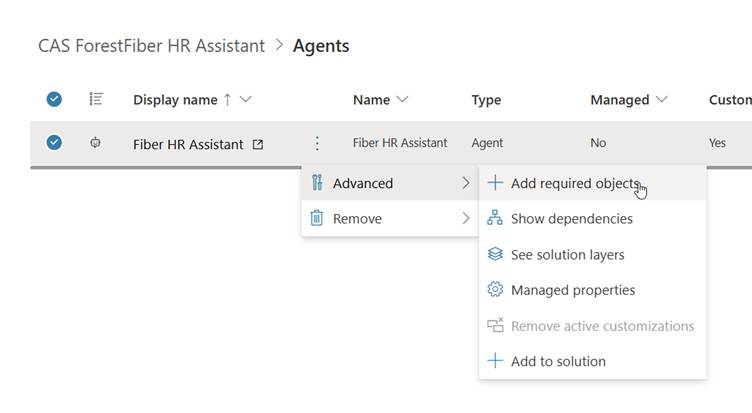
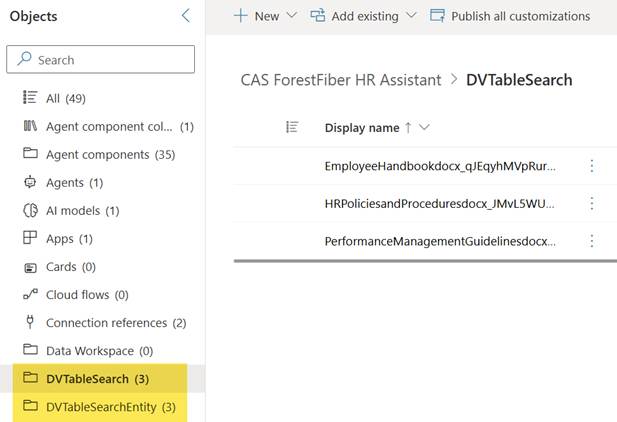
After this, you can see the Dataverse objects that were created during the synchronization process in the tables section.
During the pipeline publishing, you will be asked to create a SharePoint connection that is used to make the initial synchronization for the content. Ensure the account you are using for deployment has access to all synced documents across different repositories.
After deployment, wait until the initial synchronization is complete in the target environment before publishing the agent. Compared to uploaded documents, this situation is significantly better because the document details are automatically carried over to the new environment, eliminating the need to re-upload or set them up.
The document details are automatically carried over to the new environment, eliminating the need to re-upload or set them up.
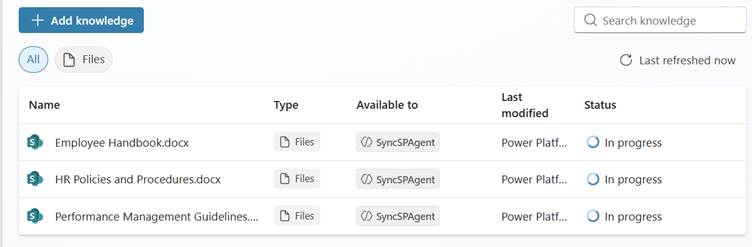
After a few minutes, your agent is ready to be published with quality answers and functions.




 Mikko Koskinen
Leave a comment